I'm writing a book!
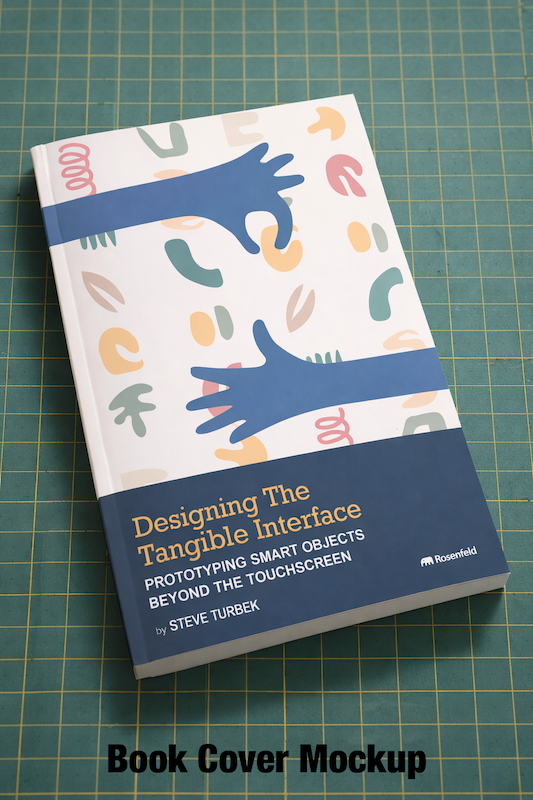
Designing the Tangible Interface
Prototyping Smart Objects Beyond the Touch Screen
By Steve Turbek
To be published by Rosenfeld Media in 2027
The Problem
Software ate the world. Car dashboards, cameras, thermostats, music players — all replaced by featureless glass rectangles. The result: products that look the same, feel the same, and exclude people who used to be able to use them.
Touchscreens don’t work for surgeons mid-procedure. They don’t work for cyclists, or drivers, or people with neurodegenerative conditions. Touchscreens also don’t work for people trying to get off their screens and live in the real world.
Physical controls can solve these problems — if designers know how to build them. The barrier to learning hardware interfaces has been too high; this book aims to make that first step easier.
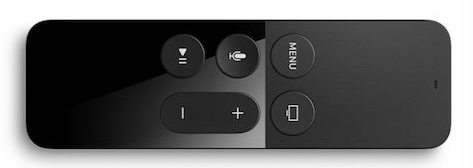
“Why is this remote so confusing? I thought Apple was good at design.”
— Steve’s mom, on her Apple TV remote
What This Book Is
Designing the Tangible Interface is a hands-on guide for designers who want to build interactive physical products — and don’t know where to start. This book connects the traditions of Industrial Design and User Experience, the forms we hold and the functions they deliver.
By the end, you’ll understand the strategic challenges and opportunities with designing for all the human senses. You’ll understand what lives inside the objects people hold — and why it matters for how they feel. You’ll be able to build working prototypes with real sensors and components. No engineering experience required, just curiosity and a sense of play.
Who It’s For
- Designers with an Arduino or Raspberry Pi sitting in a drawer
- UX designers who want to work in the real world, or who have to take on a new domain of UX
- Industrial designers adding interaction to their practice
- Anyone prototyping a product targeting home electronics, transportation, or robotics
- People who want to make a cool product for their home or studio
About the Author
Steve Turbek is an industrial design student turned digital UX designer turned teacher at Pratt Institute, where he runs the Tangible Interfaces Lab. He spent decades as head of design at financial services companies, building products used by millions of people. Returning to physical design required starting over as a beginner — an experience that became the research for this book.
Previous student projects from the lab include custom game controllers, portable music players, smart beekeeping hives, and electronic personal safety devices.
more at tangible.turbek.com
“Fail Fast” Is Terrible Advice
Learn cheaply is how great things are made.
Every product that matters started as someone finding a need and wondering “how might we” or finding a cool widget and wondering “what if?”
This book is the path from that question to a prototype in your hands — something you can test, break, redesign, and eventually be proud of.
A prototype is a cheap bet. You learn more from a $25 prototype that fails in testing than months of sketching and theorizing what people might use.
What You’ll Learn
The book is organized around the human senses you already know, as interpreted through the design process, into physical reality.
Foundations What analog and digital actually mean. Why computers are nothing like brains, and why that matters for design. The difference between “looks like” and “works like” prototypes, and when to build each.
Input — how devices perceive Buttons, joysticks, rotary encoders, pressure sensors, touch surfaces, potentiometers. Reading motion, tilt, and compass heading. Detecting light, heat, moisture, gas, proximity, and magnetic fields.
Output — how devices respond LEDs and color. Servo motors. Fans. Relays. OLED and LCD displays. Sound. Physical feedback that screens cannot replicate.
Communication Sending data over USB. Displaying information on small screens. Building a Bluetooth remote that controls your phone. Combining physical controls with on-screen interfaces.
Going further CAD and 3D printing for physical enclosures. Why hardware is hard — the gap between prototype and production. When to move beyond the Microbit to Arduino, Raspberry Pi, or ESP32.
Real-World Case Studies
Each technical chapter is grounded in products you know:
| Chapter | Case Study |
|---|---|
| Prototyping philosophy | Juicero |
| Temperature sensing | Nest Thermostat |
| Pressure input | Roli Seaboard keyboard |
| Distance sensing | Automotive parking sensors |
| Chemical sensing | Breathalyzer engineering failures |
| Magnetic sensing | Why the Hall sensor is everywhere |
| Physical + digital hybrid | Submarine cockpit controls |
| From prototype to product | Tuneshine music screen |
The Tools
BBC Microbit — A credit-card sized computer programmable from any browser, with built-in accelerometer, compass, temperature sensor, and LED display. Easy to start, no software to install.
Component kit — Around $25 of sensors chosen to cover the major interaction patterns in professional product design: touch, motion, distance, temperature, humidity, light, sound, and more.
AI assistants — Used throughout to explain errors and suggest fixes, so you focus on design decisions rather than syntax.
You made it to the end of the page! Join us!
Join a free newsletter for weekly notes on prototyping experiments, design podcast guests, and occasional dispatches from the process of writing it.